TikTok LIVE agency Chrome extension
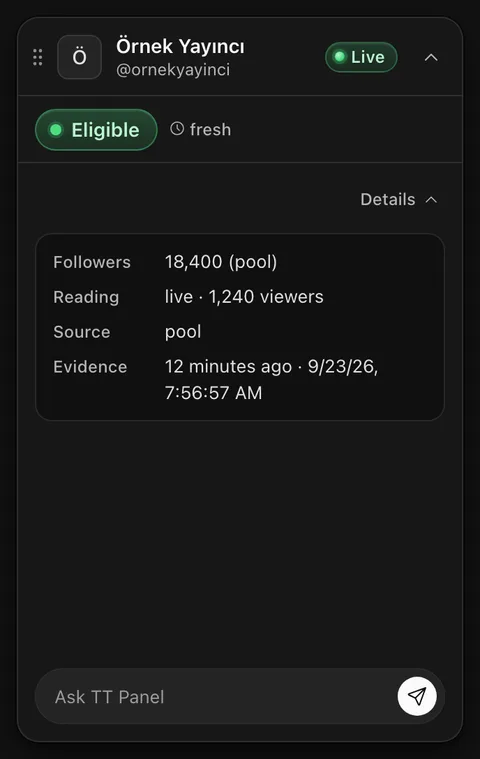
Most creator scouting happens inside TikTok itself: live streams, profiles, the discovery feed. The extension adds a card to that browsing. The status of the creator you are looking at appears at the top of the page, with no need to switch tabs.
Jumping between two screens
A scout's day tends to be the same loop over and over. They land on a live stream on TikTok, like the creator, copy the username, search for it in another tab or a spreadsheet, then open yet another screen to check the creator's status. That loop repeats dozens of times a day.
It costs you twice. The first cost is lost time. The second is the expensive one: someone in a hurry skips the check, or copies the wrong username, and writes to a creator whose status they never saw.
The extension pulls those steps into one place. The moment you see a creator on TikTok, their status is on the same page.
How the Chrome extension works
You install it in your Chrome browser. Because the extension runs on your own machine, you do not need to set up a server or pay for one. All you need is a TT Panel account, and access opens right after payment.
After that you browse TikTok as usual. When you open a creator's profile or live stream, the extension picks up the username on screen and shows that creator's status in a card at the top of the page. You see whether the person in front of you is eligible without closing the profile or the stream.
When looking one by one is not enough, you can also view creators in bulk. Instead of trying to remember everyone you came across during the day, you look at several creators side by side.
The extension also keeps an evidence record for every creator you check. From the first day, which creator was checked, when, and with what result starts to build up.
It does not make the decision for you. The extension does not send invitations and does not write to creators on its own; the person who writes and sends a message is always someone on your team. Your message templates and drafts wait ready in your browser.
What it reads and where it sends it
The extension only switches on for tiktok.com pages. There it reads the username of the creator on your screen and the state of the page: whether the stream is live, how many viewers and followers there are, the stream title and the display name. It also reads the username of the TikTok account open in your browser. It does not look at pages you open on any other site.
What it reads goes only to your agency's TT Panel server. That includes the email you sign in to the panel with, the creators you browse, the extension's usage events, and the message and comment texts your team writes through the extension. If you use the voice assistant, the recording is sent only to be turned into text and is not kept afterwards.
It leaves your TikTok cookies, password and session details alone; it neither reads nor sends them. Settings, panel address, language choice, templates, drafts and local history stay inside your browser. Local history older than 30 days is removed, and uninstalling the extension clears the rest.
The data collected belongs to your agency. It is not sold, not used for advertising, and not shared with anyone beyond the work the extension does for you.
Who it is for
Agencies that want to start without a server. Since the Extension plan runs on your own machine, you can use it on TikTok the same day you pay.
Team members who spend most of the day scouting on TikTok. The card comes to the page they already have open. They do not need to learn a new screen or keep switching between two windows.
It is also a sensible starting point for agencies planning to grow. When you need team view, roles, block list management and voice control, look at the Core plan. The Core plan includes everything in the Extension plan.
Questions about this feature
Can it see my TikTok password or cookies?
No. The extension does not read your TikTok cookies, password or session details, and does not send them anywhere. What it reads is the creator information on screen and the username of the account you have open.
Will the extension send messages or invitations for me?
No. The extension shows the creator's status and keeps a record of the check. Writing to creators and sending invitations stay in your team's hands.
Does it work on sites other than TikTok?
No. The extension only runs on tiktok.com pages; it does not read pages you open on other sites.
What happens to my data if I remove the extension?
Settings, templates, drafts and local history kept in your browser are deleted. Records already sent to the server belong to your agency; to have them deleted, just write to info@ttpanel.app.
What the Extension plan costs
The Extension plan's launch price is 249 USD a month, and its list price is 299 USD. It includes the Chrome extension, the on page eligibility card, bulk view of creators and the evidence record.
Prices are in USD, and tax is added at the payment step. If you are not happy at the end of the first month, the first month's fee is paid back.
Guides that go deeper
- Who wrote to whom on your teamDescribes the routine that stops the same creator getting two messages when several people are scouting.
- How to check eligibilityExplains the question behind the result on the card: why a creator might not be invitable.
- The cost of writing to a tied creatorSpells out what skipping the check can cost your agency.
- The record that holds up in a disputeExplains why the record the extension keeps matters when an argument starts.
See the extension in a walkthrough
In a short call we show, with demo data, how the card opens on a TikTok page and how the records build up.