TikTok agency eligibility evidence log
Did you check that creator before reaching out, and if so, what did you see? When that question comes months later, the answer should come from a record made on the day, not from memory. The evidence log fixes each eligibility check at the moment it happens and leaves a trace nobody can quietly rewrite.
The check happened, but you cannot show it
Most agencies take some kind of look before writing to a creator. Someone on the team checks the creator's status and, if it looks fine, sends the message. The check really did happen. But either nothing is left behind, or what is left is a screenshot sitting on somebody's phone.
The trouble starts weeks or months later. The agency the creator belongs to gets in touch, or the creator says they heard from you. Writing to a creator tied to another agency is grounds for sanctions, so this is not a conversation to take lightly. At that point "we checked, they were fine" is only a claim, and a screenshot with no reliable time on it will not convince anyone.
The evidence log closes that gap. The check runs through the panel and its result is written down the moment it comes back. Whether to write to the creator is still your team's call.
How the evidence log works, step by step
The first step is picking a creator. Someone on your team opens a creator from the candidate list, or spots them on the extension card while browsing TikTok. Nobody has written to anyone yet.
The second step is the check itself. TT Panel looks at the creator's eligibility and shows the result. The contact step stays closed until that check is done, so a team member in a hurry cannot write first and promise to check later.
In the third step the result goes into the log. Nobody on the team types the time in by hand; the system sets it. Once written, the entry cannot be edited or deleted. If someone tried to alter it, that would show. When asked, the log can be recomputed to demonstrate that it is intact.
The last step is the decision and the first message. If the result is clear, your team writes to the creator themselves. If not, the creator is ruled out and does not come back into your list, even after your team changes. TT Panel does not send invitations and does not write to creators for you. Its job is to keep the trail of the check.
What an entry shows
Every entry answers three questions: which creator was checked, when, and what the result was. The date alone is not enough. You need to show that on the same day you checked first and wrote afterwards, which is why each entry carries the exact time.
What is stored is not a picture of the screen but the data from the check. You can turn it into a readable view whenever you want. A screenshot can be edited in a few minutes; a log that reveals any tampering does not invite the same objection.
The checks run for a creator sit in that creator's file. Someone new on the team can open that page before looking at a creator and read what was found before.
In a dispute you do not have to open the whole log. You export an evidence package for one creator or for a date range and hand over only that. The rest of your list stays with you.
Creators who told you they do not want to hear from you are kept apart too. They are closed permanently in your own list only, and that list is never opened to another agency.
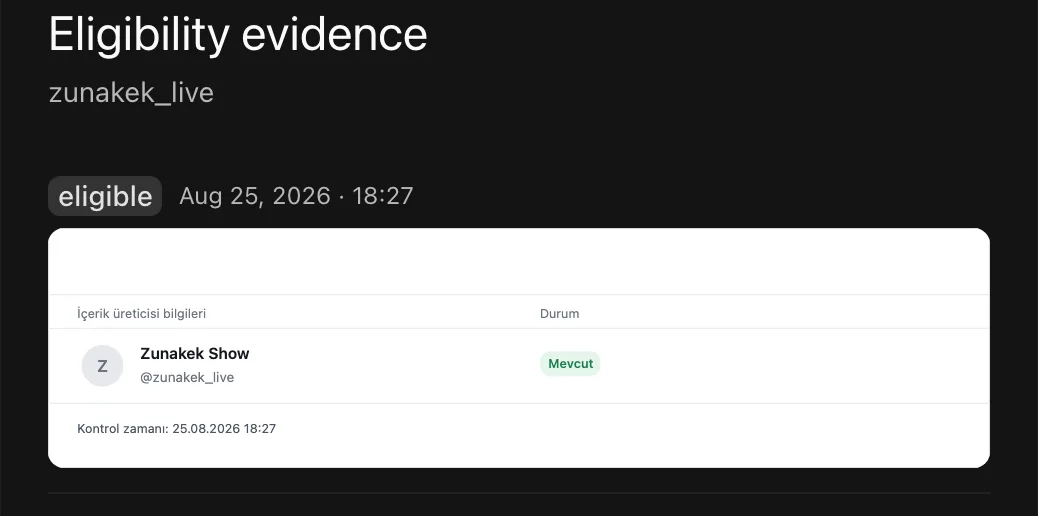
An entry in the log
How an entry looks in the panel: the creator's status at the time of the check, the result and the exact time. Taken with demo data; the creator shown is not a real account.
Who it is for
Agencies whose team has grown past a couple of people. When several people look at creators on the same day, nobody can remember who checked whom. The log belongs to the agency, not to the employee, so when someone leaves, the trail of the creators they checked stays behind.
Agency owners. When a complaint comes in, you open the creator's entry instead of calling each team member to ask what they did that day. The answer is in front of you, with date, time and result.
New agencies. An entry cannot be created after the fact; it can only be made at the moment of the check. Building the habit from day one is far easier than trying to piece old conversations together later.
Questions about this feature
Isn't a screenshot just as good?
No. The time on a screenshot is open to argument and the image is easy to edit. In the evidence log the system sets the time, the entry cannot be changed afterwards, and any tampering shows.
What if the creator joins another agency later?
The entry shows the creator's status on the day you checked. If they looked independent that day and you wrote to them on that basis, a deal they made with another agency later is not your mistake. The entry shows you acted in good faith.
Can we correct a wrong entry?
No, and that is on purpose. When you check the creator again, the new check is added as a separate entry and the old one stays where it is. A log you could edit would not count as evidence in a dispute.
Can anyone see which creators we check?
The eligibility check runs through a central service, so that service sees which creator you asked about. We do not hide this, and we bind it by contract: that information is never used in another agency's work. Your entries do not go into a pool shared with other agencies.
Which plan, and what it costs
The evidence log is in all three plans. The smallest is the Extension plan: it runs as a Chrome extension on your own machine and its launch price is 249 USD a month. For agencies that want team view, roles and block list management, the Core plan is 299 USD a month.
Prices do not include tax; tax is added at the payment step. If you are not happy at the end of the first month, the first month's fee is paid back.
Guides that go deeper
- The record that holds up in a disputeCovers the four things a useful record has to show and why it should sit with the agency.
- How to check eligibilityWalks through the situations that decide whether a creator can be invited at all.
- The cost of writing to a tied creatorExplains why reaching a creator who already belongs to another agency is so expensive for you.
- Who wrote to whom on your teamShows how to stop two people writing to the same creator and what to do when someone leaves.
See the evidence log in a walkthrough
In a 30 minute call we show, with demo data, how a check lands in the log and how an evidence package is exported.