Who wrote to whom, on record
Every first message is recorded with the account it was sent from. A second first message from the same account to the same creator does not open.
The candidate list, creator file, eligibility records and conversations sit in one panel; every employee works with their own login, and who wrote to whom stays on record.
| Agency owner | Team member | |
|---|---|---|
| Sees what the team did today on one screen | Yes | No |
| Manages settings | Yes | No |
| Sees their own work | Yes | Yes |
| Signs in with their own identity | Yes | Yes |
As the team grows, the agency's most common question becomes "who messaged this creator?" If the answer is scattered across a spreadsheet, a few phones and someone's memory, work slows down, two people reach the same creator, and an employee who leaves takes what they knew with them. TT Panel brings the agency's creator work into one panel: the candidate list, creator files, eligibility records and conversations in the same place, with every employee signed in under their own account.
One screen for the agency owner, one panel for the team. With the browser extension, a creator's status shows up without leaving the page.
The candidate list is a table: score, followers, league, eligibility result, queue status and last live each have their own column.
Click a row and the score breakdown, league history, eligibility result and its evidence, block status and queue open on one page.
Conversations with creators are collected here. The author of every message shows under it: the creator, the team or the assistant.
There is no shared password. Every employee signs in with their own account; when they leave, their access ends in one place and the records stay with the agency.
The panel has two main screens. The Creators screen is the candidate list: score, followers, league, eligibility result, queue status and last live stream in one table. The Messages screen is where conversations with creators come together. The Settings screen holds the identity and language of the person signed in.
Clicking a row opens the creator's file. It shows score, followers, league and last live stream, the eligibility result and its evidence, DM block, do not contact list and queue status on one page. Someone new to the team opens this page before looking at a creator and reads what was seen before.
You can also ask the panel in writing or by voice: how many creators did we reach today, list the creators in this league. The answer comes from the panel's own data.
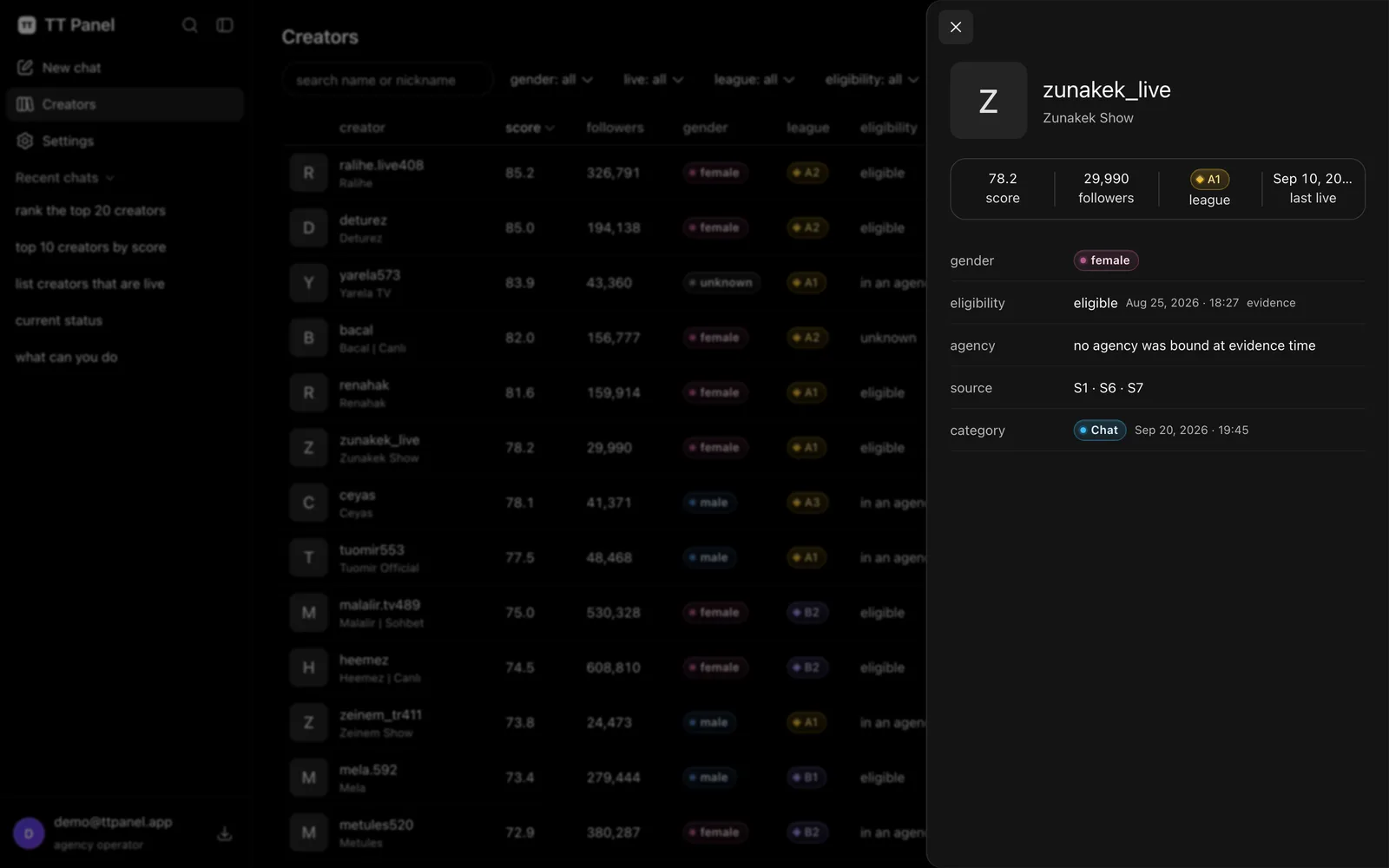
A creator's file: score, followers, league, eligibility result and evidence, block status and queue in one panel. Taken as is from the panel.
Most agencies start with a shared spreadsheet, and for a while it is enough. Then the same creator ends up on two rows, someone forgets to update a row, and who is talking to which creator stays outside the sheet. Add a shared account and a shared password, and who did what becomes invisible.
General purpose CRMs do not fully close this gap. Built for sales pipelines, they do not know a TikTok LIVE agency's real questions: is the creator tied to another agency, when were they last checked, what is their league, which account has already written to them. That information has to be carried by hand, and information carried by hand goes stale.
Every first message to a creator is recorded together with the account it was sent from. If the panel carried it forward from the agency's template, it went from the agency account; if a team member wrote from their own TikTok account through the Chrome extension, the send is recorded under that employee.
A second first message from the same account to the same creator does not open. When someone tries to write, the panel checks whether that account has already written to this creator; if it has, the send step stays closed. The queue column on the list also shows on each row whether a message went to that creator.
In conversations, the author of every message is shown under it: the creator, the team or the assistant. The unread marker is per person; each employee sees the new messages they have not opened.
There is no shared password. Every employee signs in to the panel with their own account; when someone leaves, their account is closed and their access ends from a single place. The creators they looked at, their records and conversations stay with the agency, because the record belongs to the agency, not the employee.
Each agency's data is kept separately and never goes into a pool shared with other agencies. Your block list is yours alone.
Sending starts switched off. Setting the quota, working hours and message template and turning it on is the agency's decision.
Before every first message sent from the panel or the extension, the same checks run: is the creator's eligibility check fresh, is the identity right, are they on the block list, has this account already written to them, is the daily quota full, is sending stopped, is it within working hours (not checked for a message sent by hand from the panel, one at a time; a message sent from the extension keeps to working hours). If even one fails, the message does not go.
Messages an employee writes from their own account count against that employee's own daily limit, not the agency account's quota. Automatic sending happens only during the set working hours, and a first message sent from the extension keeps to them too. Only a first message an employee sends by hand from the panel, one at a time, is exempt from the working hours check.
Each sending account sends a creator one first message: after the agency account has written, an employee can send a separate first message from their own account, but if the creator does not reply, no follow up goes out; if a creator accepts the message request but does not write, the agency can turn on a single reminder if it wants. TT Panel does not send invites.
Agencies whose team is bigger than two or three people.
Who is handling which creator is not guessed; it is on record.
Agency owners.
When a creator comes with a complaint, you open the creator's file and conversation instead of calling employees one by one.
Teams with frequent turnover.
What a departing employee knew stays with the agency, and the newcomer continues from the same file.
You can ask the panel. Say the command, and the answer or the action shows up in the panel.
“How many creators did we reach today”
It is a creator panel built for TikTok LIVE agencies. Like a CRM, it keeps people and conversations in one place; on top of that it keeps the creator's league, eligibility records and which account wrote to them. There is no sales pipeline or invoicing module.
In the queue column of the Creators list and in the creator's file. When you try to write from the extension, the panel also checks whether your account or the agency account has already written to this creator.
Their account is closed and their access to the panel ends. The creators they looked at, the records and conversations stay with the agency; a newcomer continues from the same files.
Both are possible. The panel can manage first contact from the agency account. A team member can also write from their own account through the Chrome extension; those sends are recorded under that employee and count against their own daily limit.
No. Each agency has its own setup, and records never go into a shared pool. The eligibility check passes through a central service; that service sees which creator you asked about, and by contract this information is not used for another agency's work.
The panel can be used in Turkish and English; the language is each signed in person's own setting.
The panel, creator files, sign in per employee and the record of messages written from the extension are included in the plan. Collecting conversations in the panel, first contact managed from the server and the reply assistant are in the plan too and run on our server.
TT Panel Core is 299 USD a month and includes every feature: first messages go out from 2 different TikTok accounts, and up to 4 people use the panel. For teams that run several agencies, we set the scope and price together (Contact us). Prices are in USD, and tax is added at the payment step.
Write to us on WhatsApp or by email; we answer your questions and explain the system in your own language.