First message to creators and AI replies
Finding a suitable creator is half the job. The other half is sending the first message and getting back to replies on time. As the team grows, this becomes both the most time consuming work and the easiest to get wrong. In TT Panel your team can write the first message, or the panel sends it automatically. When a creator replies, the conversation lands in the panel; if the agency wants, AI answers it using the agency's own information, and you decide which conversations to take over and when.
Why messaging falls apart
Writing to creators looks simple: a few lines, then waiting for an answer. But when several people on the team write, two of them can message the same creator, and a creator who never answered can get a second message. Replies do not follow office hours either: creators tend to answer after streaming, late at night or at the weekend. If nobody is watching, the reply waits until morning and the creator cools off.
Then there is consistency. Two people give two different answers to the same question; one copies the application address from an old note, another explains what the agency offers in their own words. With messages scattered across screens, working out later who promised what gets hard.
The answer is not unruly automation. A tool that mass messages creators without checking eligibility, writes to the same person again and again, keeps no records and ignores the platform's daily limits does not speed anything up; it puts your account at risk. TT Panel keeps speed inside the rules.
How the first message goes out
The first message is written either by someone on your team or sent automatically by the panel. For automatic sends, your agency decides the text.
Each creator gets one message. Until the creator replies, no second message, reminder or follow up is sent. A creator who does not answer is left alone.
Policy checks run before every automatic send; if even one fails, the message does not go. The creator's eligibility check is written to the evidence record at that moment, so you can later show which check came before the message. TT Panel does not send invitations.
When the creator replies
A conversation starts when a creator writes back. The panel reads the inbox and matches the message to that creator's record, so the earlier messages and who the creator is sit on the same screen. Under each message you see whether the creator, your team or the AI wrote it.
The AI layer is something the agency switches on or off. When it is on, each incoming message is classified first: is the creator asking something, chatting, saying they are not interested, or is the meaning unclear? At this step the model cannot write a sentence; it only picks one label from a fixed, closed list.
A label does not trigger anything on its own; which label leads to which outcome is written in a fixed table in the system. A question or small talk gets a reply prepared. For some kinds of question no new text is generated, and an approved answer from the knowledge base is used word for word. A message that is unclear or suspicious is left to the team.
When a reply is written, the model relies on the agency's knowledge base: what the agency does, how earnings work, gifts, requirements, stream hours, how to apply. If an application link is needed, the model does not type the address. It only signals that a link is needed, and the system inserts the address from the agency's own record.
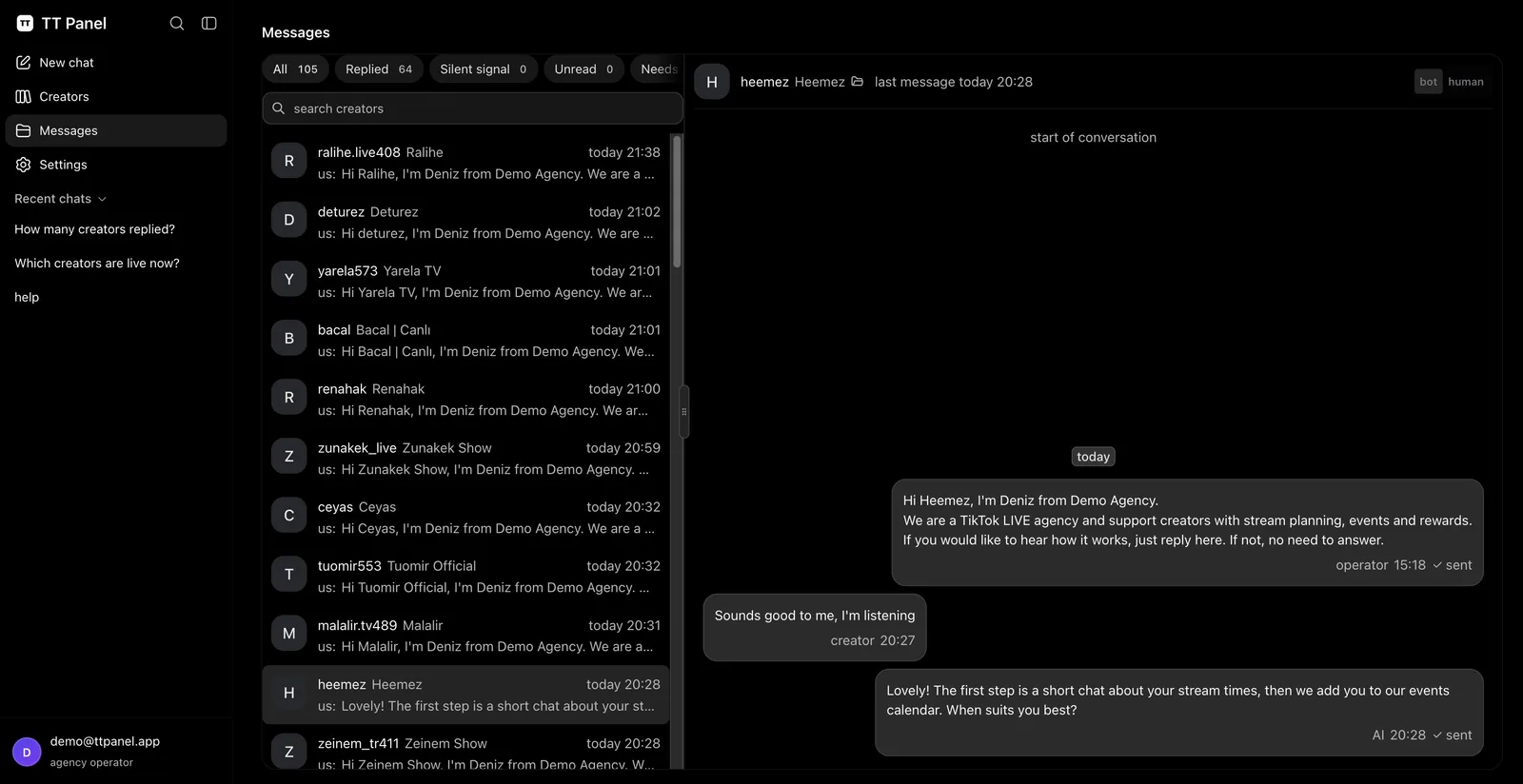
The Messages screen
A conversation in the panel: the first message, the creator's reply and the AI's answer. Taken from the demo environment; names and texts are examples and do not belong to a real creator.
No AI reply leaves without passing the rules
Text written by the model never goes straight to the creator. It first passes through a fixed rule layer. There is no AI inside that layer: its rules reach the same verdict on the same text every time. A message cannot talk it round, and no setting switches it off.
The rules look at content and form. The text must not contain a link or an address, drift into another script, or carry invisible characters or long dashes. No fragment of the system's own instructions may leak into it. Overlong replies, repeated sentences and template fields left unfilled are turned back too. A reply that fails is not trimmed or patched; it is not sent.
When a reply is rejected, an approved answer for that situation is used if one exists; otherwise the conversation stays with your team. Approved answers added to the knowledge base pass the same rules when they are saved.
The AI has no authority
The model only proposes text. It cannot change records, switch settings, run tools, send a message itself or make up a link. The only things in front of it are the conversation and the agency's knowledge base.
Which message gets a reply, whether a text goes out and who a conversation is handed to are decided by the system's rules. The text of a queued reply is fixed at that moment and is not rewritten at send time.
Three conversation modes: AI, human, muted
Every conversation has a mode, and the mode decides who answers it. In AI mode, replies that passed the rules go out. Sending model replies also depends on a switch the agency controls; while it is off, no model reply is sent, but messages your team writes in the panel still go out.
In human mode the AI stays out of that conversation and your team writes. The moment an operator writes in a conversation from the panel, it switches to human mode and any AI reply waiting in the queue is cancelled, so the team and the model never talk over each other. The system also hands a conversation to the team on its own and marks it "needs a human" in the list: when the message is unclear, the topic is outside the knowledge base, or the reply fails the rules.
In muted mode nothing is answered automatically. Messages with harassment, insults, spam, sexual content or scam attempts get the conversation muted, and it shows as muted in the list. A creator who asks you not to write again goes on your block list and gets no further messages.
Who it helps
Agencies that reach many new creators every day. The first message can leave the team's hands, and the team spends its time on creators who replied.
Agencies that do not want night and weekend messages left waiting. With the AI layer on, common questions do not wait for morning, and your team looks at the conversations that need a decision.
And agencies that would rather not hand conversations to AI. You can leave the layer off or move single conversations to human mode; the panel then works as a shared screen where replies collect and your team answers. The agency owner sees who was written to and which conversation is waiting for the team on one screen.
Questions about this feature
Does the first message go to every creator?
No. The automatic message only goes to creators who pass the policy checks, and each creator gets it once. If the creator does not reply, no second message is sent.
Does the AI write the first message?
No. Your agency decides the text of the automatic first message, or your team writes the first message itself. The AI only replies in conversations the creator has answered, and only when the layer is on.
What if the AI tells a creator something wrong?
Replies are based on your agency's approved knowledge base and pass fixed rules before they are sent. A reply that fails the rules does not go out, and the conversation stays with your team. The whole conversation stays in the panel, and you can take over at any time.
Could the AI send a made up link?
It cannot. Text that carries a link or an address is turned back by the rule layer. When an application link is needed, the system adds it from the address in the agency's record.
How do I take over a conversation?
Write in that conversation from the panel. The moment you do, it switches to human mode and any AI reply waiting in the queue is not sent. To hand it back to the AI later, you change the mode.
Does the AI send invitations?
No. TT Panel does not send invitations. The AI only replies to questions in the conversation; it has no authority to change records or switch settings in the panel.
Which plan includes it
The automatic first message and AI replies are part of the Core and Enterprise plans and run on our server. The Core plan's launch price is 299 USD a month, and its list price is 349 USD. The Extension plan does not include this feature; the extension does not write to creators on its own.
Prices are in USD, and tax is added at the payment step. If you are not happy at the end of the first month, the first month's fee is paid back.
Guides that go deeper
- Who messaged whom in the teamDescribes the routine that stops the same creator getting two messages when several people write.
- The risk of messaging a tied creatorExplains why the check has to come before the first message.
- How agencies find creatorsWalks through the process from discovery to the eligibility check and the first message.
See messaging in a walkthrough
In a short call we show, with demo data, how the first message, the AI reply and taking over a conversation look in the panel.