Is a creator eligible for your agency? How to check invite eligibility
Published:
Not every creator can accept an agency invite. This guide covers what decides invite eligibility, how to check it by hand in Backstage, and why the check needs to be recorded.
Is this creator eligible for your agency? Why ask first
Liking a creator does not mean you can send them an agency invite. TikTok does not let every creator join every agency. A creator might already be with another agency, might be outside the region you operate in, or might not yet meet the platform's requirements. Reaching out in any of these cases wastes time at best, and puts your agency at risk at worst.
That is why agencies that run well keep a clear order: check eligibility first, make first contact second. In this guide we cover which situations determine invite eligibility, how to check by hand in LIVE Backstage, how to read the result, and why the check needs to be recorded. If you are just setting up your agency, you may also want to read how to start a TikTok LIVE agency first.
The rules described here come from TikTok's Creator Network management policy for agencies and from its multi account policy. The screen names below are what we saw in Backstage's Turkish interface, translated; the English interface may word them differently. Both can change over time; check the platform's own pages for the current version.
What decides whether a creator is eligible?
The management policy lists three examples of creators an agency cannot form a management relationship with, and adds that the list is not limited to these.
The first is a creator already at another agency. A creator who has joined another agency's network on the platform, or who has a commercial partnership with TikTok, is not eligible for you. This is the most expensive item on the list, because reaching them is not just a wasted invite, it also raises suspicion of poaching another agency's creator.
The second is the platform's own requirements. The policy also lists creators who do not meet Diamond level, follower level and other eligibility requirements TikTok sets from time to time as ineligible. The policy does not give the numbers behind these requirements, and neither do we.
The third is region. A creator physically located outside the region agreed in the agency's service agreement with TikTok is not eligible for that agency. In other words, the same creator can be eligible for one agency and not for another.
Account status matters too. The multi account policy names underage accounts, accounts already at an agency, and banned accounts as examples of ineligible creators, and treats a creator joining a second agency through a second account as a violation. Under the policy, who owns an account is decided by looking at who appears most often in recent streams. An account with a different username but run by the same person is therefore not a new creator.
The creator's side of the invite is also described on the official pages. The creator gets their own invite code from the Agency Center in the app, the agency starts the invite with that code, and the creator reads it and decides whether to accept. Nothing is formed unless the creator accepts; the agency's job starts before the invite, at the decision of whether to reach out at all.
What shows up on the Backstage invite screen?
The official place to check eligibility is the invite screen in LIVE Backstage. In its interface it opens under a heading like "Invite creators" and runs through a few steps. In the first step, "Add creators", you type one username per line into a box; the limit we saw was 30 usernames at a time.
In the second step, a row appears for each username you entered. The table has "Status" and "Invite type" columns. The results we saw in the Status column were these.
"Available": the creator appears eligible to be invited by you. These rows also show invite type; some creators appear eligible only for a "Normal" invite, others only for a "Premium" invite. The two types have separate quotas, shown on the same screen as invite quota.
"Not eligible": the creator cannot be invited. A short reason appears underneath, such as "At another agency" or "Other reasons".
"Unsupported region": the creator does not appear in the region your agency operates in.
"Not found": no account was found for the username you typed. A typo or a changed username can also produce this result; on its own it does not mean the account was closed.
How do you check by hand in Backstage?
The steps are simple. Log in to Backstage with your agency account and open the creator invite screen. In the first step, type the usernames you want to check, one per line, and move to the next step. Read the status of each row in the table on the second step. Copying the username from the creator's profile cuts down on Not found results caused by typos.
There is one point worth watching here. Next to rows that look eligible on the second step sits an Invite button, and that button actually sends the invite. Checking eligibility is not the same as sending an invite, but one wrong click on the wrong row makes it exactly that. If your only goal is to check, read the table and close the screen.
The job is not done once you have read the result. You need to write down when the check was made and what the result was for each creator. Once you close the screen, only you have seen that table; if you did not write down the result, the rest of the team has no way to know it.
If more than one person on the team runs checks, add one more rule: also write down who ran the check. It is normal for two people to check the same creator on different days and see different results, because a creator's status can change. If who checked when is written down, that difference becomes a matter of dates, not an argument. If it is not written down, the team has to guess which result is current.
How should you read the result of a check?
"Available" is the state at that moment, not a permanent permission. A creator who looks eligible today might sign with another agency tomorrow. Writing to a creator based on an old check is not very different from not checking at all. The check should happen right before first contact.
"At another agency" is clear: do not reach this creator with an agency offer. Take them off your candidate list and make sure nobody else on the team adds the same name back later. Region results usually do not change on their own either; looking at these creators again and again wastes the team's time.
"Not found" and "Other reasons" are less clear. It is reasonable to check the username again and look once more. When you are not sure, the safest move is to wait; the cost of one message sent in haste is bigger than the cost of waiting a few days.
Why do you need to keep a record of the check?
Because the real question usually comes later. Writing to a creator tied to another agency is a serious matter under policy: the management policy lists forming a relationship with a creator in another agency's network, and poaching another agency's creators through improper means, as prohibited behavior, and the penalties include a drop in health score, restrictions on inviting new creators, and payout deductions. When an argument comes up, the first question is always the same: did you check before you wrote?
The same policy also lists reporting other agencies without sufficient evidence as prohibited behavior. So these disputes run on evidence. "I checked" is not evidence. A screenshot is weak too, its date is disputable and it is easy to edit. A hand kept spreadsheet has the same problem, because every cell can be changed afterward.
A record that actually works shows three things: the date and time the check was made, what the result was, and that the record was not changed afterward. We cover why a record like this carries more weight than anyone's word in a dispute in a separate guide on what to have on hand in a dispute.
How does TT Panel record this check?
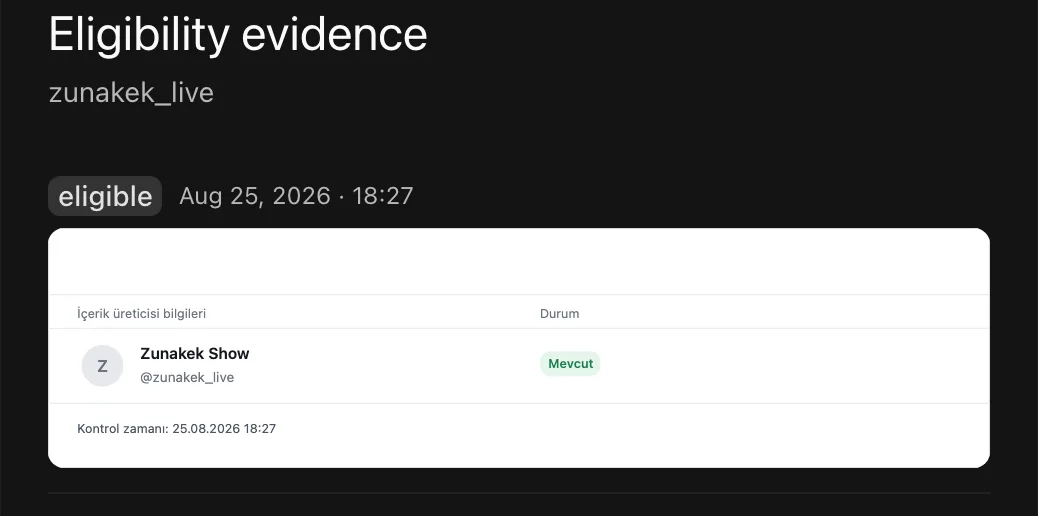
We built TT Panel exactly for this gap. In the panel, a creator's status is checked before you reach out, and the check is recorded at that moment. The contact step does not open until the check is done. The record is timestamped, cannot be changed or deleted afterward, and any tampering would show. That the record has not been tampered with can be proven on demand by recomputing it.
The evidence is not a screenshot, it is the data itself, and it can be turned into readable form whenever you need it. If a dispute comes up, you can pull an evidence package for a single creator or a date range and hand it to the other party. A creator eliminated once does not fall back into the list even if the team changes. With the browser extension, your team sees the status of the creator they are looking at in a card at the top of the page while browsing TikTok.
Two things worth being upfront about. The eligibility check runs through a central service, and that service sees which creator you are asking about; we bind by contract that your data will not be used in another agency's business. Compliance with platform rules is the agency's responsibility; the panel shows the eligibility result and the evidence record for every creator.
Is there a short checklist before you invite?
Yes. Did you copy the creator's username from their profile? Did you run the check right before first contact, or are you relying on an old result? Is the result "Available", and what is the invite type? Is the date, time and result of the check somewhere every team member can see, that cannot be changed afterward? Has a creator marked "at another agency" been permanently removed from your list?
This guide is not legal advice. Always read the current version of platform rules on TikTok's own pages; screen names and penalties can change over time.
If you want to see how we keep a record of every check for your team, request a walkthrough of the panel.
Request a walkthrough
Let us walk you through it in 30 minutes: the panel, the evidence record and how your team will work.